


Botley coding robot kit from Learning Resources
Until a few years ago when N started school, I had no idea what STEM was. I still have to look it up – Science, technology, engineering and maths. But nowadays it’s everywhere, and STEM toys are taking over. Because don’t all parents love educational toys, especially when they’re fun and children don’t realise they’re learning at the same time. We were sent the Botley coding robot kit to try out, and it’s certainly educational fun, giving children what might be their first coding experience.

Botley is a colourful little robot which aims to inspire young children to try coding. There’s different ways to program Botley, without smartphones or tablets. Phew, because I don’t like having lots of apps on my phone and the way that so many toys or services nowadays relies on them.
What’s included?
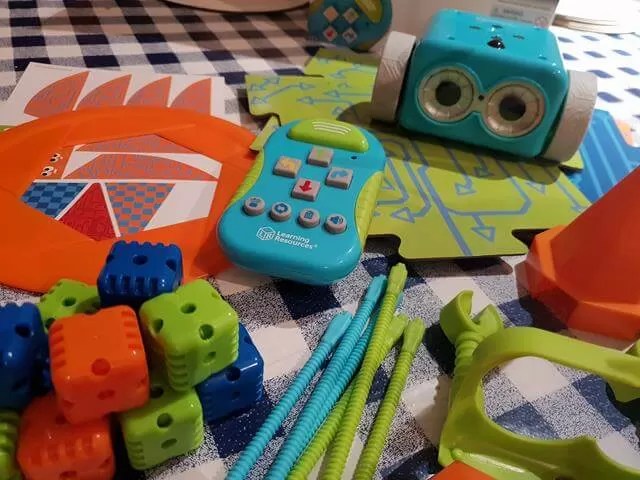
As well as Botley, there are some arms, lots of brightly coloured balls, sticks and flags to use as obstacles and get Botley to play football. And there’s also some ‘jigsaw piece’ double sided card pieces which join together so you can tell Botley to do different actions. There’s also a remote control for easy coding and some coding cards.
Coding options
The buttons on the remote control are basic and easy to understand – so there’s left, right, forward, backwards. There’s also the clear (rubbish bin) button, loop, and object detect. You can freestyle code and do your own thing which N preferred, or you can plan your coding programme by using the coding cards, before inputting the order into Botley or the remote.

The loop function enables you to repeat a set of instructions. You can add further steps on to build up a bigger sequence, or clear previous steps and then start from scratch. If you’re adding on steps, Botley will start from the first sequence again.
Botley will also follow a line. N loved this – you can switch the button from code to line, place Botley on the end of a line and he’ll happily go along the line (and back again if there’s an end). N decided he wanted to send Botley on a huge trail so kept adding line pieces that Botley had gone past up ahead to make a continuous never ending trail. We didn’t try it because we couldn’t find our long roll of paper, but you can draw your own thick black line and let Botley follow that.

Botley can also detect objects. We didn’t grasp this brilliantly, until we read it properly, as you can’t have the arms attached to use the object detect. Once removed, you can tell Botley what to do when he gets to an object. This is about the What If logical function, so a great way to get children to think of these types of steps.
You can make Botley play football and pick up and move objects. N made him scoop up the football and moved it to the goal. This wasn’t as easy as we expected because it’s hard for kids to gauge how far Botley goes on one step (it’s about 20cm). N had to learn to press in order thinking about steps, rather than just pressing forward lots of times until the robot crashed into something in the house!

Once you’ve programmed in your code, the transmit button sends Botley on his way.
Easter Eggs – secret codes
The information and manual that comes with Botley is easy to understand and helps children build up through learning set codes, then lets them do their own thing. Of course, N just wanted to do his own thing anyway.
I was a fan of the little Easter Eggs (secret codes) provided in the booklet. They’re pretty simple but who doesn’t want to make a robot do donuts and go dizzy!? Me!
What we liked about Botley
- Botley is really simple to use and learn how to code
- There’s lots of different options and accessories meaning children can have different playtime with Botley every time they play
- It’s robust for little hands and the buttons are easy to press and use.
- You aren’t limited by what’s in the pack, you can draw your own lines and freestyle your coding
- Educational toys are always good, and it ties in well with the type of coding early years and foundation stage kids are learning.
What we weren’t so keen on
- It’s definitely for younger children. It’s targeted at over 5s which is a good age. N’s nearly 8 and while he enjoyed playing with Botley, it feels and looks quite young with the huge buttons and remote. I don’t think at his age he’d want to play with it for much longer
- It’s pricy – there’s a lot in the pack and lots of options. STEM toys do tend to be quite pricy. But it should last as it’s robust and doesn’t have little pieces to break off.
The Botley coding robot kit is aimed at over 5s and available from Learning Resources.
Have your children discovered coding yet? How do they practice doing it?
——————————————-
Disclosure: We were sent the Botley coding robot kit for the purpose of review


